Getting Started with engager
engager package
2026-09-14
Source:vignettes/getting-started.Rmd
getting-started.Rmd
library(engager)
#> Welcome to engager!
#> - Start with: vignette('getting-started', package='engager')
#> - Core functions: vignette('essential-functions', package='engager')
#> - Sample data: system.file('extdata/test_transcripts', package='engager')
#> - Quick example: example(summarize_transcript_metrics)
#>
#> To suppress this message: options(engager.show_startup = FALSE)
library(dplyr)
#>
#> Attaching package: 'dplyr'
#> The following objects are masked from 'package:stats':
#>
#>     filter, lag
#> The following objects are masked from 'package:base':
#>
#>     intersect, setdiff, setequal, union
library(ggplot2)
Getting Started with engager
The engager package helps instructors analyze student
engagement from Zoom transcripts, with a particular focus on
participation equity. This vignette will get you started with the basic
workflow.
Quick Start
The beginner workflow loads, processes, summarizes, plots, and exports one transcript with privacy-supporting defaults:
transcript_file <- system.file(
  "extdata/test_transcripts/intro_statistics_week1.vtt",
  package = "engager"
)

results <- basic_transcript_analysis(
  transcript_file,
  output_dir = tempfile("engager-getting-started-")
)
#> Creating output directory: /tmp/RtmpFneGWo/engager-getting-started-64f222b59d36
#> ==> Starting Basic Transcript Analysis
#> ========================================
#> FILE: File: intro_statistics_week1.vtt
#> DIR: Output: /tmp/RtmpFneGWo/engager-getting-started-64f222b59d36
#> PRIVACY: Privacy: high
#>
#> Step 1/5: Loading transcript...
#> SUCCESS: Loaded 56 transcript entries
#> Step 2/5: Processing transcript...
#> SUCCESS: Processed transcript data
#> Step 3/5: Analyzing engagement...
#> SUCCESS: Calculated engagement metrics
#> Step 4/5: Creating visualizations...
#> SUCCESS: Created engagement visualizations
#> Step 5/5: Exporting results...
#> SUCCESS: Exported results to /tmp/RtmpFneGWo/engager-getting-started-64f222b59d36
#>
#> COMPLETE: Basic analysis complete!
#> RESULTS: Results saved to: /tmp/RtmpFneGWo/engager-getting-started-64f222b59d36
#> TIP: Next steps:
#>    - Check the output files in /tmp/RtmpFneGWo/engager-getting-started-64f222b59d36
#>    - Use show_available_functions() to see more options
#>    - Use set_ux_level('intermediate') for more functions
head(results$analysis)
#> # A tibble: 4 × 13
#>   transcript_file   name      n duration wordcount comments perc_n perc_duration
#>   <chr>             <chr> <int>    <dbl>     <dbl> <I<int>>  <dbl>         <dbl>
#> 1 intro_statistics… Stud…    14      155       361       14   46.7         71.8
#> 2 intro_statistics… Stud…     6       23        48        6   20           10.6
#> 3 intro_statistics… Stud…     5       19        37        5   16.7          8.80
#> 4 intro_statistics… Stud…     5       19        40        5   16.7          8.80
#> # ℹ 5 more variables: perc_wordcount <dbl>, n_perc <dbl>, duration_perc <dbl>,
#> #   wordcount_perc <dbl>, wpm <dbl>
print(results$plots)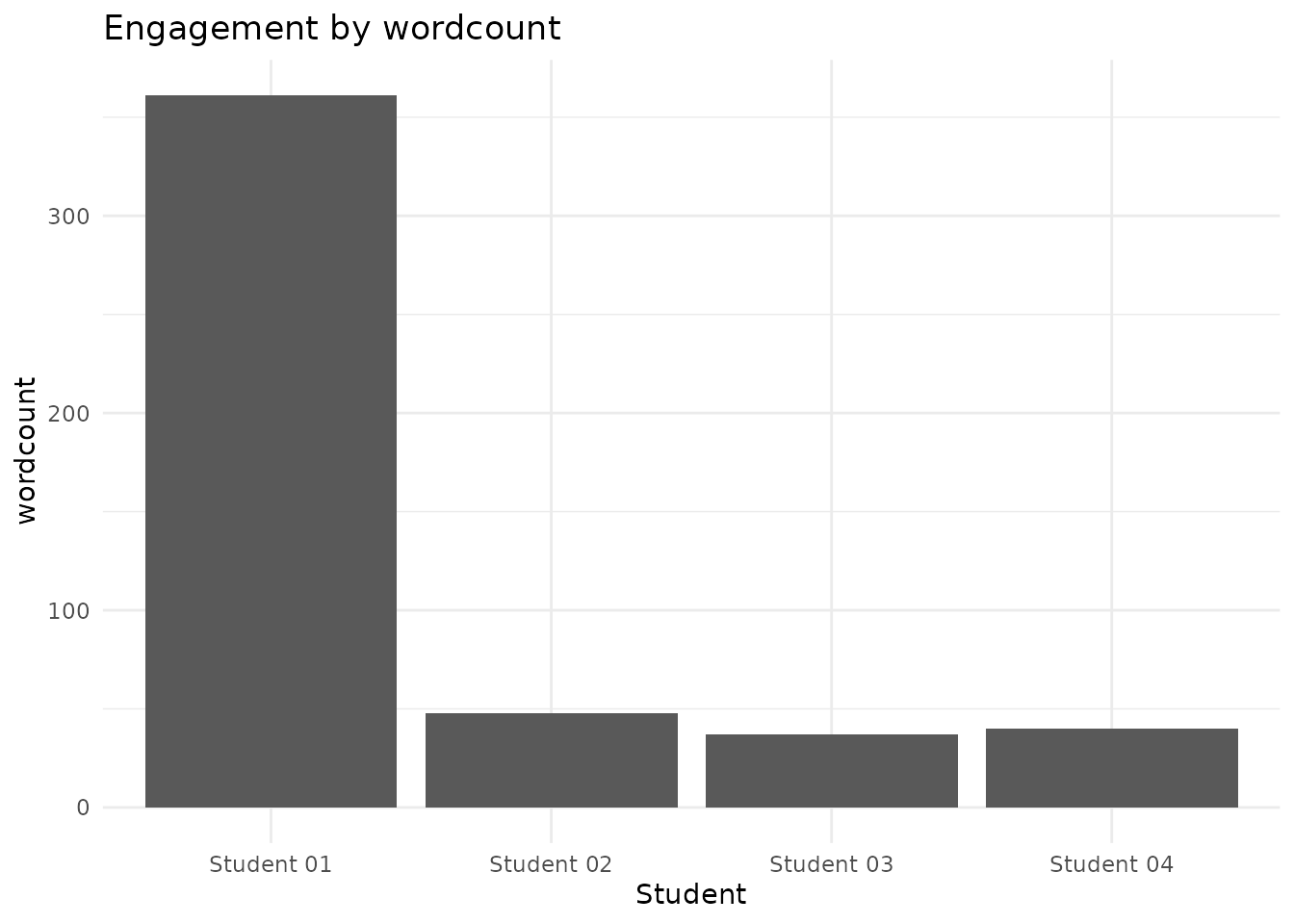
For explicit control, compose the public processing functions and pass the processed object forward instead of re-reading the file:
transcript <- load_zoom_transcript(transcript_file)
processed <- process_zoom_transcript(
  transcript_df = transcript,
  consolidate_comments = TRUE,
  add_dead_air = TRUE
)
summary_metrics <- summarize_transcript_metrics(
  transcript_df = processed,
  names_exclude = c("dead_air")
)

# View the results (recognized structured identifiers are masked by default)
head(summary_metrics)
#> # A tibble: 4 × 13
#>   transcript_file   name      n duration wordcount comments perc_n perc_duration
#>   <chr>             <chr> <int>    <dbl>     <dbl> <I<list>  <dbl>         <dbl>
#> 1 intro_statistics… Stud…    14      155       361 <chr>      46.7         71.8
#> 2 intro_statistics… Stud…     6       23        48 <chr>      20           10.6
#> 3 intro_statistics… Stud…     5       19        37 <chr>      16.7          8.80
#> 4 intro_statistics… Stud…     5       19        40 <chr>      16.7          8.80
#> # ℹ 5 more variables: perc_wordcount <dbl>, n_perc <dbl>, duration_perc <dbl>,
#> #   wordcount_perc <dbl>, wpm <dbl>

# Run a technical privacy review
privacy_result <- privacy_audit(summary_metrics)
cat(
  "Privacy review:",
  ifelse(nrow(privacy_result) == 0, "No recognized issues flagged", "Review flags returned"),
  "\n"
)
#> Privacy review: Review flags returned
What the Package Does
The engager package provides tools for:
- Loading and Processing Zoom Transcripts: Convert Zoom VTT files into analyzable data
- Calculating Engagement Metrics: Measure participation by speaker/student
- Name Matching and Cleaning: Match transcript names to student rosters
- Visualization: Create plots to analyze participation patterns
- Exporting: Write privacy-supporting participation metrics and summaries
- Privacy Review: Support technical review and institutional oversight
- Masking and Data Transformation: Reduce exposure of recognized structured identifiers
Basic Workflow
The typical workflow involves:
- Setup: Configure your analysis parameters and privacy settings
- Load Transcripts: Import and process Zoom transcript files
- Load Roster: Import student enrollment data
- Clean Names: Match transcript names to student records
- Analyze: Calculate metrics and create visualizations
- Review Privacy: Review outputs and apply masking or other transformations where needed
- Export: Write privacy-supporting metrics and summaries; save returned plot objects explicitly
Version 0.1.0 provides per-session metrics, summaries, and plot objects. It does not generate a polished course-level engagement report or support longitudinal individual-student reporting.
Exact Name Matching
match_names_workflow() compares normalized transcript
speakers with roster names and aliases. Version 0.1.0 supports exact
matching only and reports unresolved speakers instead of guessing.
roster <- tibble::tibble(
  preferred_name = c("Alice Smith", "Bob Jones"),
  student_id = c("S1", "S2"),
  aliases = c("A Smith; Alice S", NA_character_)
)

transcripts <- tibble::tibble(
  speaker = c("alice smith", "carol"),
  timestamp = as.POSIXct(
    c("2025-01-01 10:00:00", "2025-01-01 10:01:00"),
    tz = "UTC"
  )
)

matching <- match_names_workflow(
  transcripts,
  roster,
  options = list(match_strategy = "exact")
)

matching
#> engager_match: 1/2 matched; 1 unresolved
matching$unresolved
#>                                                          name_hash       reason
#> 2 4c26d9074c27d89ede59270c0ac14b71e071b15239519f75474b2f3ba63481f5 no_candidate
#>                                    guidance           timestamp
#> 2 Add alias to roster or correct transcript 2025-01-01 10:01:00
Review unresolved speakers locally before deciding whether to add an
authorized roster alias or leave the speaker unresolved. See
?write_unresolved for the privacy-supporting
unresolved-name export.
Getting Help
For detailed troubleshooting guidance: - Check the package
documentation: ?match_names_workflow -
Find unmatched names before matching:
?detect_unmatched_names - Review the supported
workflow: See ?match_names_workflow and
?write_unresolved
Next Steps
-
For visualization: see
vignette("plotting") -
For exported function coverage: see
vignette("essential-functions") -
For privacy, ethics, and institutional review
considerations: see
vignette("privacy-ethics-review")
Getting Help
- Check package documentation with
help(package = "engager") - Open vignettes with
browseVignettes(package = "engager") - Report issues on GitHub at
https://github.com/revgizmo/engager/issues